ROVR
An explorer’s toolkit
The map: cut into squares.
Pass through one and it becomes yours.
ROVR shows you the squares you’ve collected —
and where to go next.
Have an account? Sign in.
ROVR for watches is in Garmin’s Connect IQ Store, free, for 67 watches: Forerunner, fenix, epix, Venu, vivoactive and more. Your tiles come along on every run and walk, and a new one turns green the moment you step into it, with a buzz on your wrist if you want one.
Strava starts every new app with room for ten explorers. ROVR’s ten spots are now taken, and Strava is reviewing it to allow us to let more people join. The day Strava says yes, I start working through the waiting list, first come, first served.
Not the waiting type? Sign up today with Ride with GPS or your GPS files, and plug Strava in later. Your tiles will be waiting.
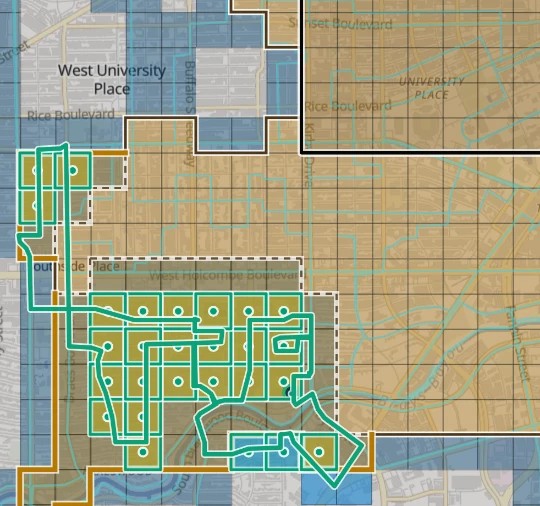
Each square is a tile. ROVR maps the ground you’ve covered, finds what you’ve missed, draws routes to collect it, and keeps the log. You may have been hunting tiles for years without knowing it!
Connect Strava or Ride with GPS, or upload your GPS files. There is nothing to install.
In the box today
Find your next tiles. See unexplored tiles near you, easiest first, plus the exact tiles standing between you and a bigger square.
Plan a route around them. Pick the tiles you want and ROVR draws a route to collect them. Send it to Ride with GPS with one click, or download it for Strava or your bike computer. Route drawing works on six continents, from Ushuaia to Tromsø, and it’s learning more.
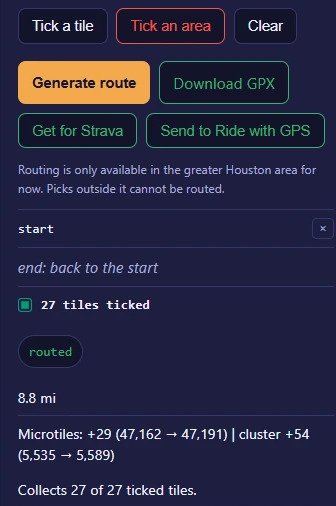
Try before you go. Paste in a Ride with GPS route to see what it would add to your map before you lace up or clip in.
Stretch my route. Bring a route you already like. Get it back a little longer and a lot richer: “6% longer, 9 more tiles.”
A route that picks its own tiles. Say how far you feel like going. ROVR finds the loop with the most new ground — and where to park if the best loop starts somewhere else.
In your wake. After an outing, ROVR points out the unexplored tiles you brushed past, so you can take care of unfinished business next time you’re there.
Detour nudge. ROVR spots the roads you ride every week and points out the new tiles just off them.
ROVR in your route planner. Planning the route is half the game. The Chrome extension lays your explored tiles over the route builders on Strava and Ride with GPS, and the new tiles on your route turn green as you draw.
ROVR on Garmin Edge. See your tiles on your head unit as you ride. New ones turn green the moment you roll into them. It’s free in Garmin’s Connect IQ Store.
ROVR on your Garmin watch. On foot, the watch zooms in to Microtiles and draws the streets around you. Step into a new one and it turns green, with a buzz on your wrist if you want one. Your watch already knows you’re outside. Now it knows where you haven’t been. It’s free in Garmin’s Connect IQ Store.
Every point counts. ROVR reads every GPS point you recorded. Some services count from a simplified outline that can miss a tile. You earned those tiles, and ROVR counts them all.
Your logbook, kept for you. Rides, runs and paddles that find new ground get a line in their description: what you bagged, how your map changed, and the weather you went through if you like (US only for now). Did you see one on a friend’s ride or run? Maybe that’s how you got here.
Crossing counts. Draw a line across a river or the end of your street and find out how often you’ve crossed it. “You have crossed this river 214 times.”
A scoreboard. See how your map stacks up against other explorers. Counts only: nobody else sees where you go.
Plan with your crew. Tiling expeditions are more fun when you can all grab some new tiles along the way. Start a crew, send your friends the link, and ROVR plans one loop with new tiles for everybody on it. Your crew gets its own scoreboard too.
How the game works
Tiles. Everyone shares the same squares. Pass through one, even just a corner, and it is added to your collection. ROVR tracks three grid sizes: big, middle and small. A middle tile is about a mile across, a little less the further you live from the equator. Filling one big square and collecting a hundred small ones are different games. Both are fun.
A grid you already know. ROVR’s middle tiles match the explorer tiles used by other tile-hunting services.
Your cluster is the patch of explored tiles with explored neighbors on all four sides. Corners don’t count. A long, thin line won’t make a cluster, however far it reaches — but a fat blob certainly will.
Your max square is the biggest square you can make out of explored tiles, with no holes in it. Going from 3 by 3 to 4 by 4 takes seven more tiles, all in exactly the right spots. This is harder than it seems, but that’s the point. A lake can stop a square cold. A cluster just goes around it.

A place is a smaller patch of tiles cut off from your main patch: a vacation, a race in another state, or the town you grew up in. Give it a name. Close the gap and the two join into one big, happy cluster.
What counts. Outdoor, human-powered activities with a GPS track count: bikes, feet, boats and skis. Some tiles will get you into a kayak. Indoor and virtual rides don’t count, however hard you pedaled. As far as ROVR is concerned, only the outside world is real!
How far you go
A map says where you’ve been. These two say how far you reach.
Your Eddington number is 50 when you’ve gone at least 50 miles on at least 50 different days. Each step up moves the goalposts, which is the fun of it. It works in kilometers too, if that’s how you count.
Your Mex is a ladder with a rung for every whole-mile distance. A 7.4-mile run fills rung 7; a 100-mile ride fills rung 100, but not the rungs on the way. Your Mex is the last filled rung before the first gap, and that missing rung? An excellent excuse to head out!
250. The first 250 explorers to sign up get ROVR Plus free for life. Plus isn’t here yet, but when it lands, it’ll be the FULL kit: unlimited drawn routes, ROVR on your Garmin, full weather write-ups, unlimited crossing counts, and your whole history fetched for you. The game itself stays free for everyone, so there’s no rush. (Well, maybe a little bit.)
Every tile is worth a visit.